Software Engineer, Platform / Files and Preview Experiences
Work
Quick Look and Files on iPhone and iPad
Platform Engineering
Making document workflows feel native, fast, and lightweight on iPhone and iPad.
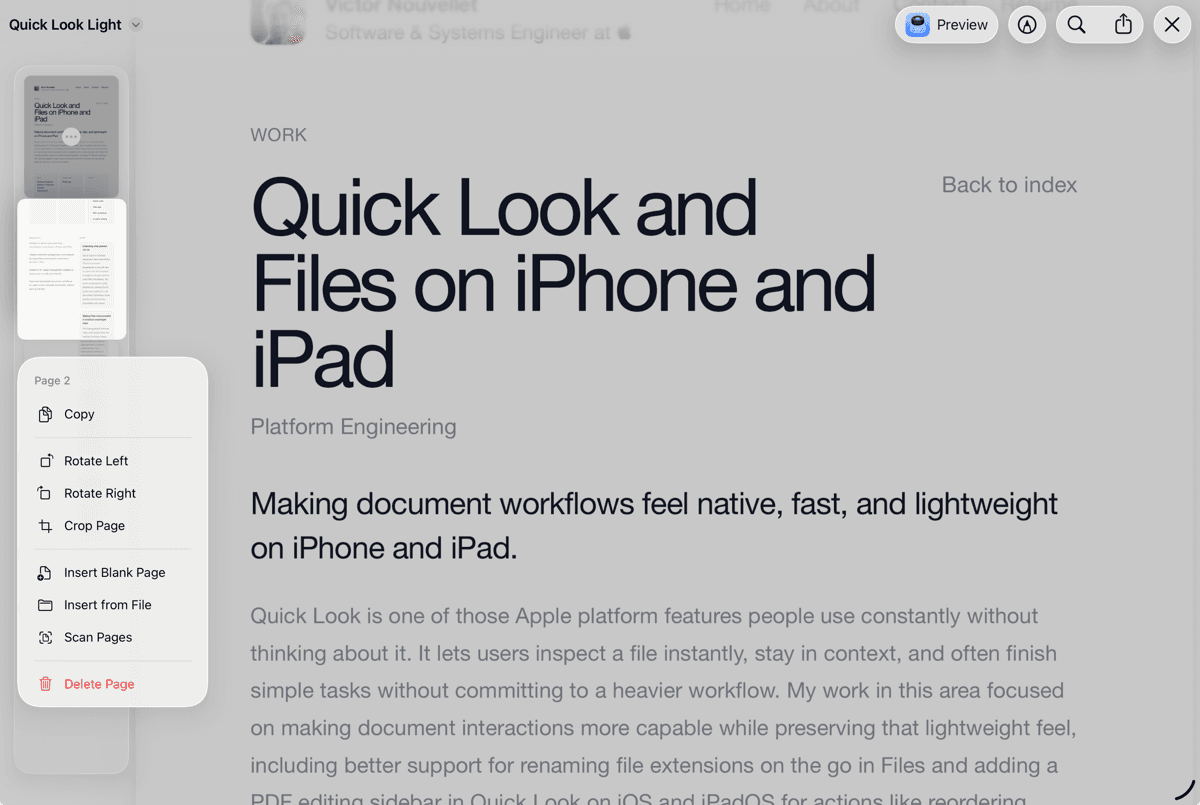
Quick Look is one of those Apple platform features people use constantly without thinking about it. It lets users inspect a file instantly, stay in context, and often finish simple tasks without committing to a heavier workflow. My work in this area focused on making document interactions more capable while preserving that lightweight feel, including better support for renaming file extensions on the go in Files and adding a PDF editing sidebar in Quick Look on iOS and iPadOS for actions like reordering, deleting, inserting, and scanning pages.
Highlights
- Worked on Quick Look and Files experiences used across iPhone and iPad.
- Helped make file management more flexible by supporting renaming file extensions directly in Files.
- Added a PDF page management sidebar to Quick Look on iOS and iPadOS.
- Improved lightweight document workflows so users could complete more tasks without leaving preview.
Story
Extending what preview can do
Quick Look is valuable because it removes friction. The best preview experience is not just fast to open, but also capable enough to let users act on what they are seeing. My work contributed to that balance by making Quick Look more useful for real document workflows while keeping the interaction immediate and native.
Making Files more powerful in small but meaningful ways
File management features often look simple from the outside, but they shape how confident and efficient users feel when working on mobile devices. One improvement I worked on was allowing file extensions to be renamed directly in Files. It is a small detail, but one that matters when users need more direct control over real files instead of a simplified abstraction.
Bringing PDF editing closer to the content
I also worked on a PDF sidebar in Quick Look on iOS and iPadOS that makes page-level editing much more direct. From the preview itself, users can reorder pages, remove pages, insert blank pages, insert pages from a file, and add scanned pages. The goal was to let people perform common document-editing tasks exactly where they are already viewing the PDF, rather than forcing them into a more fragmented workflow.
Keeping advanced workflows lightweight
What makes this work interesting is not just adding functionality, but doing it in a way that preserves the character of the platform. Quick Look should still feel light, immediate, and obvious. Files should still feel approachable. The engineering challenge is to make advanced workflows available without making the overall experience feel heavier.